



Most case management software rollouts don't fail on go-live day. They fail around week six, when three caseworkers are still keeping a parallel spreadsheet "just in case," the intake team has stopped trusting the client records because half of them are missing consent flags, and a supervisor is manually re-entering data every Friday to build a report the system was supposed to generate automatically.
That slow-motion collapse is the pattern worth understanding, because it's almost never about the software being bad. It's about treating migration, adoption, and training as three separate projects that happen to share a calendar. They aren't separate. They're one system, and when one part lags, the whole thing drifts back toward paper and side-channel workarounds.
This playbook covers how those pieces connect, where they snap under load as an agency grows, and a phased approach that keeps friction low enough that people actually switch over instead of pretending to.
Why rollouts collapse in the second month, not the first
The first week runs on adrenaline and leadership attention. Everyone's watching, IT is on standby, problems get fixed fast. The dangerous window is weeks four through eight, when the executive sponsor has moved on and caseworkers are back to full caseloads with a tool they only half-understand.
Here's the mechanism. A caseworker carrying 35 to 45 active cases doesn't have slack time to "learn a system." They have time to close the case in front of them. If the new platform adds even 90 seconds of friction to something they used to do in 30 seconds, they'll route around it — a note in a Word doc, a client status tracked mentally, a referral logged "later" that never gets logged. Each workaround is individually reasonable. Collectively they hollow out the data the whole agency depends on.
What tends to happen across agency rollouts is that the technical migration goes fine. It's the coordination that breaks. Intake enters data one way, the family services team expects it another way, and nobody agreed on who owns the client record when two teams touch the same case. The software just makes that pre-existing ambiguity visible and expensive.
The software doesn't create your coordination problems, it inherits them. If handoffs were fuzzy on paper, they'll be fuzzy in the system too — except now there's an audit trail showing exactly how fuzzy.
The three systems that have to move together
A rollout is really three interlocking workstreams. Miss the interlock and you get the second-month collapse.
Eliminate case management chaos.
TryCasi helps you organize, monitor, and report on every case efficiently and securely.
- Centralized case tracking
- Automated client notifications
- Team task coordination
No credit card required
| Workstream | What it moves | Common failure point | Who owns it |
|---|---|---|---|
| Data migration | Historical cases, active caseload, consent records, referral history | Dirty legacy data imported as-is; no field mapping agreement | Ops lead + a data-savvy caseworker |
| Adoption | Daily behavior of frontline staff and supervisors | Feature overload; no visible early win | Supervisors, not IT |
| Training + support | Skill-building tied to real casework, not abstract demos | Generic training weeks before anyone touches real cases | Trainer + supervisor pair |
The trap is sequencing these linearly — migrate everything, then train everyone, then hope for adoption. Migration should be phased so training happens on real data the person actually recognizes, and adoption gets measured from day one instead of assumed.
The connective tissue is governance. If you haven't nailed down who owns a case at each handoff, the rollout will expose that gap immediately. It's worth working through a cross-team casework governance structure with clear SOPs and handoff ownership before migration, not during. Otherwise you're debugging two problems at once.
Phased data migration: don't move the mess
The most common migration mistake is treating it as a bulk copy. Agencies export ten years of case files and dump them into the new platform — complete with abbreviations only one retired caseworker understood, inconsistent client name formats, and consent records that may or may not still be valid.
Then the new system launches looking cluttered and untrustworthy, and staff conclude it's worse than what they had.
-
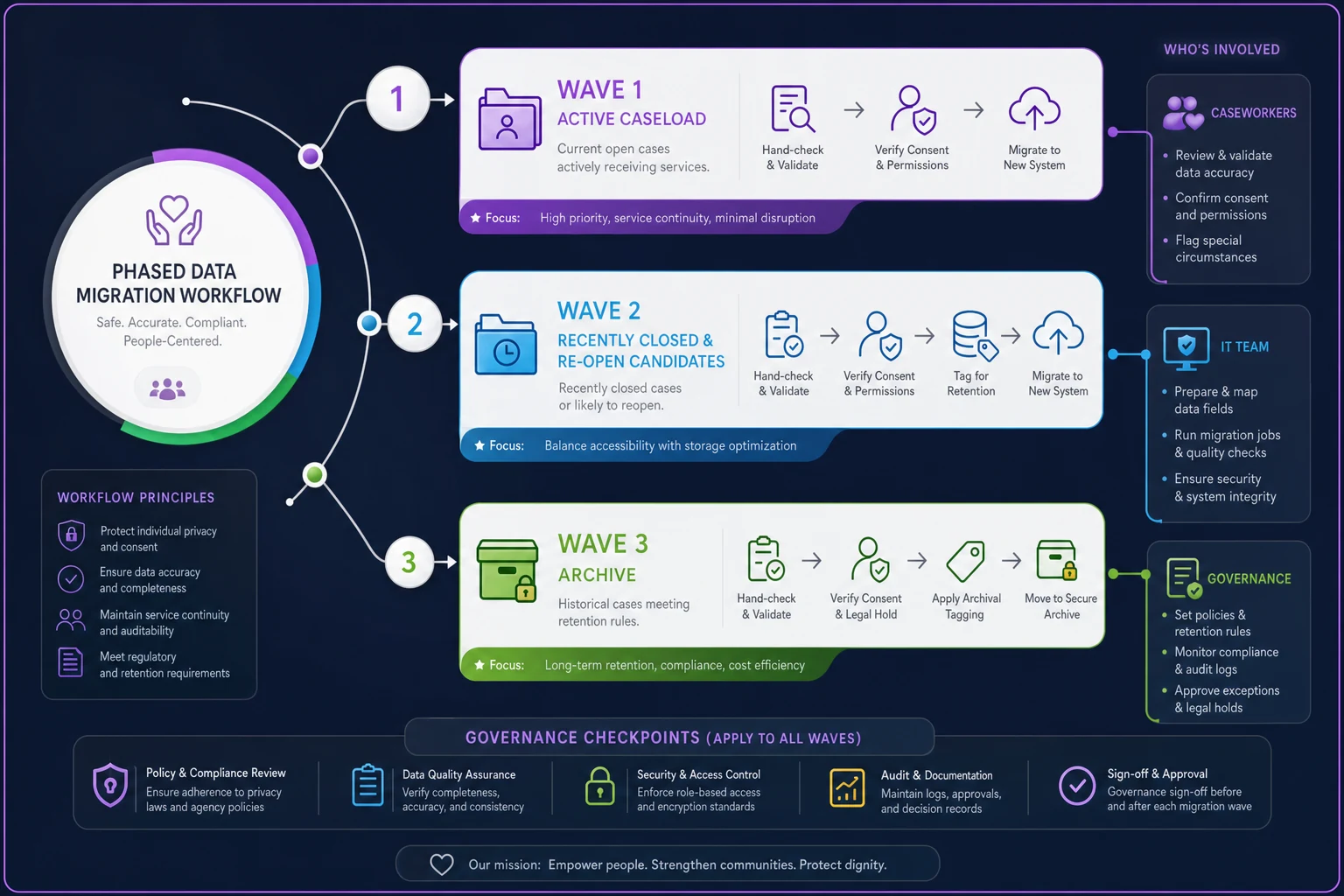
Wave 1 — Active caseload only. Migrate currently open cases, roughly the last 12 to 18 months of activity. This is the data people touch daily, so errors surface fast and get fixed by the people who actually know the case. Keep it small enough to hand-check. For a mid-size agency this might be 400 to 700 active records rather than the full archive.
-
Wave 2 — Recently closed and re-open candidates. Cases closed in the last year that could realistically re-open. These need clean data because a returning client is a bad moment to discover the record is garbled. Verify consent status during this wave — expired consent is one of the biggest hidden liabilities in legacy data. If your consent handling has been inconsistent, tighten it using proper operational consent workflows with redaction rules and frontline decision trees as your migration checklist.
-
Wave 3 — Archive. Everything older. This can move in a bulk batch with lighter cleaning, tagged clearly as archival so nobody mistakes it for active data. Some agencies keep this in read-only form or even leave it in the old system for a defined retention window rather than forcing it in.
Phase your migration in three waves instead.
A migration template that actually gets used
-
Client identifier (agreed format — decide first name/last name/DOB order once, enforce it everywhere)
-
Active status and assigned worker
-
Consent status and expiration date
-
Open referrals and their state
-
Last contact date
-
Flags
safety, language/interpreter need, accessibility
If a field is missing or ambiguous, it gets a "needs review" tag rather than a guess. The point isn't perfection — it's that dirty data enters the system labeled as dirty instead of quietly poisoning trust.
Here's a quick visual of the phased migration workflow.
One thing that works reliably: assign one caseworker per team to co-own migration alongside IT. That person recognizes when "J. Ramirez, closed" is actually still an open case under a different spelling. IT won't catch that. A caseworker will.
Supervisor quick-wins: adoption lives or dies here
Frontline adoption follows supervisors, not mandates. If a supervisor still asks for the Friday report in the old format, staff keep feeding the old format. So the fastest lever in any rollout is giving supervisors something that makes their week visibly easier in the first two weeks — before the honeymoon attention fades.
The mistake most rollouts make is showing supervisors the full feature set. That's overwhelming and none of it feels urgent. Instead, deliver two or three things that solve a pain they already feel:
-
The auto-generated caseload snapshot. Replace the manual Friday tally with a live view of who's carrying what, which cases haven't had contact in X days, and which are overdue for review. A supervisor who spent 90 minutes assembling this by hand getting it in one click is the single most persuasive demo you can run.
-
Overdue and flag alerts. Cases with expiring consent, missed follow-ups, or unaddressed safety flags surfaced automatically. Supervisors stop being surprised in monthly reviews.
-
One-click handoff visibility. When a case moves between teams, the supervisor can see it landed and got accepted — no more chasing.
These aren't the fanciest features. They're the ones that convert a skeptical supervisor into someone who defends the system when their staff grumble. That advocacy is worth more than any training session.
Ship the auto-generated caseload snapshot first — it's the single most persuasive demo for converting skeptical supervisors.
Modern platforms handle a lot of this quietly in the background — flagging overdue contacts, drafting caseload summaries, catching a consent record about to expire. The value isn't the automation itself; it's that supervisors stop spending attention on assembly work and can put it back on cases that actually need judgment.
When a supervisor quick-win is a bad idea
Don't build a custom quick-win for a workflow you're about to change. If your handoff process is getting overhauled next quarter, automating the current broken version just cements it. Get the process right first, then automate the stable version.
The 30/60/90 adoption SLA — tied to casework, not logins
Most training plans measure the wrong thing. "95% of staff completed the training module" tells you nothing. Someone can finish a module and still keep their spreadsheet. What matters is whether real casework is happening in the system and whether outcomes hold steady through the transition.
Days 1–30 — Do real work, supported. Training happens on the caseworker's own migrated active cases, not demo data. Support is high-touch: someone reachable within the hour during business hours. The goal isn't mastery. It's that every caseworker has entered at least a handful of real contacts, logged one referral, and closed or updated one case entirely in the system. SLA target: 90%+ of active caseload visible and current in the system. Response time on blocking issues under one hour.
Days 31–60 — Shift from "can they" to "do they." Support moves to same-day rather than instant. Focus turns to the workflows people avoid — the annoying ones they route around. Supervisors run their quick-win reports live in team meetings so staff see the data being used. This is where you catch the parallel spreadsheets and retire them. SLA target: parallel/shadow systems identified and being phased out. Handoffs happening in-system. Response time same-day.
Days 61–90 — Prove it against outcomes. Now compare casework outcomes to your pre-rollout baseline. Are follow-ups happening on time? Did contact frequency hold? Are referrals closing? This is where a real outcome measurement framework with indicators and a data cadence earns its keep — you can't claim the rollout succeeded without knowing whether client outcomes stayed stable or improved. SLA target: outcome indicators at or above baseline. Support transitions to standard channels. Any indicator that dropped gets a named owner and a fix plan.
What breaks as the agency scales
A rollout that works for a 20-person agency can quietly fall apart at 80 people, and the reasons are structural.
At small scale, informal coordination covers a lot of gaps. Everyone knows who handles what. The data can be a little messy because a quick conversation resolves the confusion. As headcount grows, those conversations stop scaling. The system becomes the coordination mechanism, which means data quality that was tolerable at 20 people becomes crippling at 80.
-
Handoff ambiguity multiplies. With three teams, there are a handful of handoff types. With eight teams and partner agencies in the mix, the combinations explode, and every undefined handoff becomes a case that stalls in nobody's queue.
-
Report drift. Different supervisors start defining "active case" or "closed" slightly differently. Small variations compound into agency-level numbers nobody trusts, which pushes people back to manual reconciliation.
-
Training decay. New hires get trained by whoever's free, who teaches their own workarounds. Within a year the "standard" process exists in four incompatible versions.
The defense is boring but effective: a single source of truth for definitions, migration templates that enforce format consistency, and onboarding that trains new hires on the system's workflow rather than a mentor's habits. Growth punishes ambiguity, and the rollout is your one clean chance to remove it.
A real scenario
A regional family-services agency with around 55 staff had bought a case management platform, migrated everything in one weekend bulk import, and run a two-day training six weeks before anyone touched real cases. By week five, roughly a third of caseworkers were maintaining shadow spreadsheets, and supervisors were still hand-building weekly reports because the system's data was too inconsistent to trust.
They restarted the rollout with the phased approach. Active caseload — around 600 records — migrated first with per-team co-owners hand-checking each record. Two supervisor quick-wins shipped in week one: the auto caseload snapshot and consent-expiry alerts. Training ran on people's own live cases.
By the 90-day mark, shadow spreadsheets were essentially gone, supervisor report-prep dropped from most of a Friday afternoon to a few minutes, and on-time follow-up rates had climbed back to — and slightly past — their pre-rollout baseline. Nothing dramatic in the numbers, just a system people actually used instead of tolerated. The difference wasn't the software. It was the sequence.
Who should slow down before rolling out
This phased approach assumes a few things are in place. If they aren't, fix them first:
-
If handoff ownership is undefined, sort that before migration or you'll automate confusion.
-
If your consent records are a known mess, budget real time for Wave 2 cleanup — don't paper over it.
-
If leadership won't commit attention through the full 90 days, delay. A rollout that loses its sponsor in week three will drift back to paper regardless of how good the plan is.
-
If you're mid-reorganization, wait. Migrating into workflows you're about to change is wasted effort twice over.
If these preconditions aren't met, slowing down and fixing them pays off. Rushing past governance, consent hygiene, or leadership commitment just guarantees the second-month collapse.
The takeaway that actually matters
The reason rollouts feel risky is that agencies treat them as a technology event. They're not. They're a coordination event that happens to involve software. The migration exposes your data hygiene, the adoption phase exposes your governance gaps, and the 90-day outcome check exposes whether any of it actually served clients better.
Sequence the three workstreams so they reinforce each other — real data in training, quick-wins that convert supervisors early, and a support commitment measured in casework outcomes rather than login counts — and the second-month collapse mostly stops happening. Not because the software is magic, but because you gave people a reason to switch and never a reason to route around it.
Sequence the three workstreams so they reinforce each other — real data in training, quick-wins that convert supervisors early, and a support commitment measured in casework outcomes rather than login counts — and the second-month collapse mostly stops happening. Not because the software is magic, but because you gave people a reason to switch and never a reason to route around it.
Ready to transform your social services workflow?
Join 500+ agencies using TryCasi to improve case outcomes, enhance collaboration, and reduce administrative burden.