


Most small social-service teams don't fail at data governance because they don't care. They fail because governance gets framed as a compliance chore that lives in a binder nobody opens. Meanwhile the actual data — the phone numbers, the consent dates, the risk flags — keeps drifting out of sync with reality, one rushed intake at a time.
The gap worth closing here isn't "you should have a policy." You probably have one. The gap is between the policy and the daily workflow: who can touch what, what a valid field actually looks like, and how you catch problems before an auditor, a funder, or worse — a client in crisis — catches them for you.
This is written for supervisors and case managers, not IT. No SQL knowledge assumed. The three pieces that actually hold governance together at small scale are: a role-based access matrix, field-level validation rules, and a monthly lightweight audit. Get those three working together and you've covered about 80% of what enterprise data governance frameworks try to solve with ten times the overhead.
Why data governance in social services breaks differently than it does anywhere else
In a normal business, bad data costs you money. In social services, bad data costs someone their housing appointment, their prescription, or their safety plan. That raises the stakes, but it also changes how the failures show up.
The pattern that repeats across small teams: governance gets treated as a static event. You set up the case management system, assign logins, write a confidentiality agreement, and consider it done. But data governance isn't a setup task. It's a running system with three moving parts that constantly fall out of alignment:
-
Access drifts because staff turnover means old logins linger and new people get "temporary" admin rights that never get revoked.
-
Data quality drifts because every caseworker enters information slightly differently, and nobody's fields look quite like anybody else's.
-
Oversight drifts because the person who was supposed to spot-check records got promoted, went on leave, or just got buried.
Each of these is manageable alone. The problem is they compound. Loose access means more people editing fields inconsistently. Inconsistent fields make audits harder. Skipped audits mean access problems go unnoticed. You end up with a dataset that technically exists but that nobody fully trusts — which quietly means people start keeping "real" notes in a side spreadsheet, and now you have a shadow system with zero governance at all.
That shadow-spreadsheet moment is the clearest warning sign a governance system has already failed. If your caseworkers are maintaining private tracking docs, they're telling you the official record isn't reliable enough to work from.
The three-part system, and how the parts connect
Before the templates, it helps to see how these pieces reinforce each other — because most teams build one and skip the other two.
Eliminate case management chaos.
TryCasi helps you organize, monitor, and report on every case efficiently and securely.
- Centralized case tracking
- Automated client notifications
- Team task coordination
No credit card required
A role matrix without validation rules means you've controlled who touches data but not what shape the data takes. Validation rules without audits means you've defined "correct" but never verify it stays correct. Audits without a role matrix means you find problems but can't tell who introduced them or who's allowed to fix them.
Think of it as a loop:
-
The role matrix limits who can create, edit, or delete each type of field.
-
Validation rules constrain what those authorized people can enter.
-
The monthly audit checks whether both are actually holding, and feeds corrections back into the first two.
A simple loop view can help teams see how each piece feeds the next.
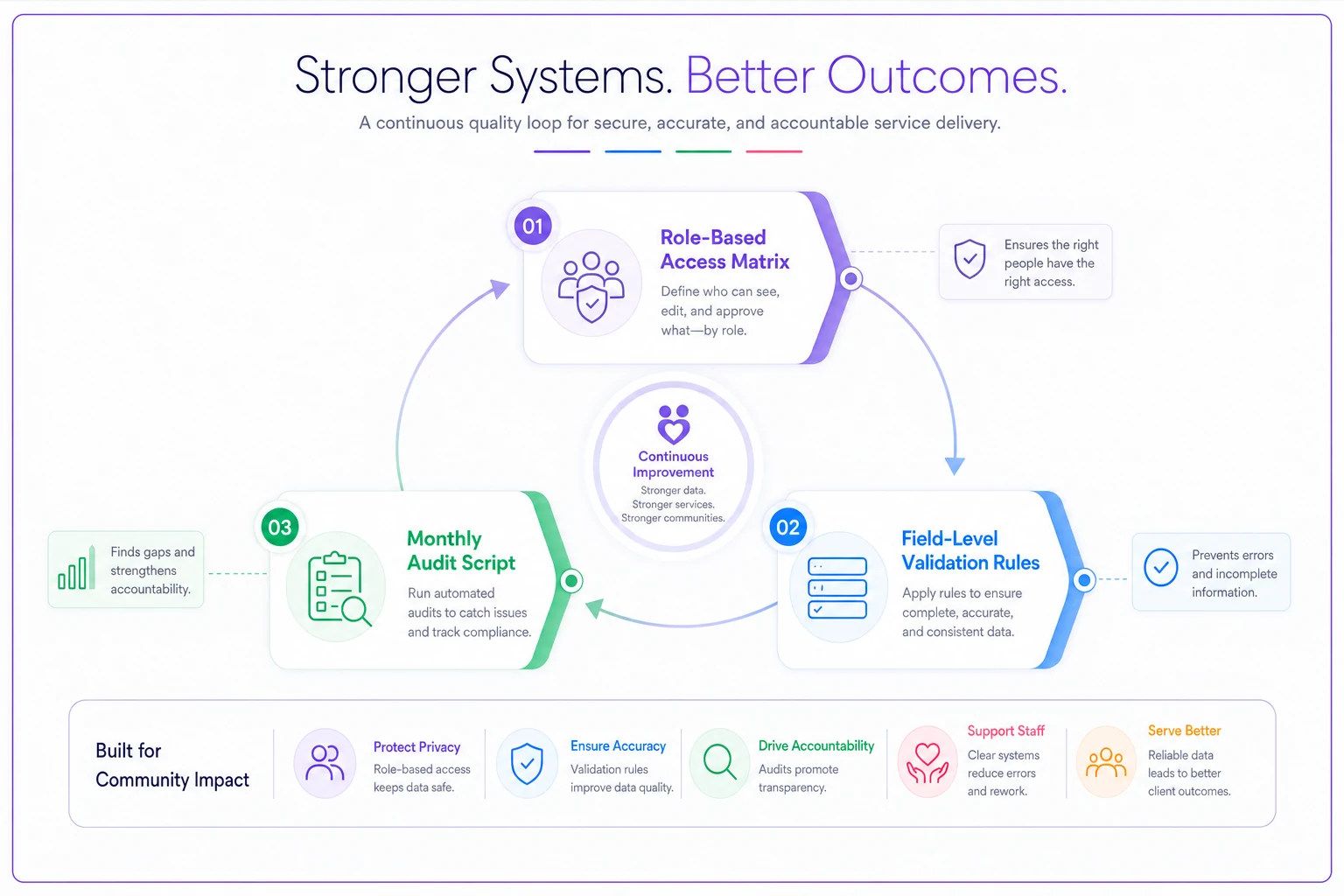
When one part is missing, the loop leaks. And leaks at small scale look small — until you hit 300, 500, 800 open cases and the drift becomes structural.
Part 1: The role-based access matrix
Small teams overcomplicate this by copying enterprise permission schemes with fifteen roles. In practice, most social-service teams need four or five. The goal isn't granular control for its own sake — it's making sure the person entering a consent date isn't also the person who can silently delete it.
A workable matrix maps roles (rows) against data categories (columns), with a permission level in each cell: View, Edit, Create, or None. Keep the categories broad enough that staff can actually remember them.
| Role | Client contact info | Case notes | Risk / safety flags | Consent records | Financial / benefits data | User access settings |
|---|---|---|---|---|---|---|
| Frontline caseworker | Edit | Create/Edit own | Create/Edit | Create | View | None |
| Senior caseworker | Edit | Create/Edit all | Create/Edit | Create/Edit | Edit | None |
| Supervisor | Edit | View all, Edit flagged | Edit | Edit | Edit | View |
| Intake/admin staff | Create/Edit | View | View | Create | Edit | None |
| Program director / admin | Edit | View all | Edit | Edit | Edit | Edit |
| Volunteer / student | View assigned | View assigned | None | None | None | None |
A few decisions inside this table matter more than they look:
Delete is almost never a standard permission. There's no "Delete" column above — and that's intentional. In small teams, accidental or unlogged deletion is a bigger risk than over-restriction. Deletions should route through a supervisor, or be soft-deletes (marked inactive, not erased), so nothing disappears without a trail. If your system supports record-level history, turn it on before you do anything else.
Consent gets its own column for a reason. Consent isn't a checkbox buried in the client record — it drives what you're allowed to share and with whom. If your consent handling is loose, the access matrix can't save you. It's worth pairing this with proper operational consent workflows and redaction rules so that the permission to view consent and the permission to act on it stay connected.
Volunteers and students see "assigned only." The most common access mistake at small scale isn't a data breach — it's a well-meaning volunteer browsing the full caseload because nobody scoped their login. Assigned-only access fixes this without making volunteers useless.
Keeping the matrix alive
The matrix rots the moment someone leaves and their login stays active. Tie access review to two triggers you already have: onboarding and offboarding. When someone starts, their role determines their permissions from the table — no ad-hoc "just give them what Maria has." When someone leaves, access gets revoked the same day, not "when IT gets to it."
For everyone in between, one supervisor review per quarter is enough at this size. You're checking three things: does each active user still need their role, are there any accounts that haven't logged in for 60-plus days, and does anyone have admin rights who no longer needs them.
Tie access review to onboarding and offboarding so permissions don't linger after staff changes.
For everyone in between, one supervisor review per quarter is enough at this size. You're checking three things: does each active user still need their role, are there any accounts that haven't logged in for 60-plus days, and does anyone have admin rights who no longer needs them.
Part 2: Field-level validation for common social-service fields
This is the part most teams skip entirely, and it's the one that quietly wrecks reporting. Validation means the field itself refuses bad input or flags it — so the correction happens at the moment of entry, when the caseworker still has the client in front of them, instead of three months later during an outcomes report.
The operational reality: the fields that cause the most reporting pain are almost always free-text ones that should have been structured. "Housing status" typed as free text produces "homeless," "unhoused," "in shelter," "temp housing," and "couch surfing" — five entries that mean overlapping things and can't be counted together.
-
Phone number — enforce a consistent format; flag entries that are clearly incomplete. A surprising share of failed outreach traces back to a phone field with the wrong number of digits.
-
Date of birth / dates generally — block future dates for DOB, block impossible dates, and warn on entries that make the client under 5 or over 110 (catches typos like a transposed year).
-
Housing status — dropdown, not free text. Pick a fixed vocabulary (ideally one that matches your funder's categories) so it counts cleanly.
-
Consent status and date — consent "yes" should require a consent date; you can't have one without the other. This single rule prevents a large chunk of audit failures.
-
Risk / safety flags — require a note or date whenever a flag is set to active, so a flag never sits there without context.
-
Referral / partner agency — dropdown from a maintained list, not free text, so referral tracking doesn't fracture into misspelled agency names.
-
Case status — controlled values only (Open, Pending, Closed, Re-opened) so caseload counts stay trustworthy.
-
Primary language — dropdown, so language-access reporting is possible at all.
The rule of thumb: if you ever want to count it, filter by it, or report on it, it shouldn't be free text. Free text is for genuine narrative — case notes, circumstances, next steps. Everything you need to aggregate should be constrained.
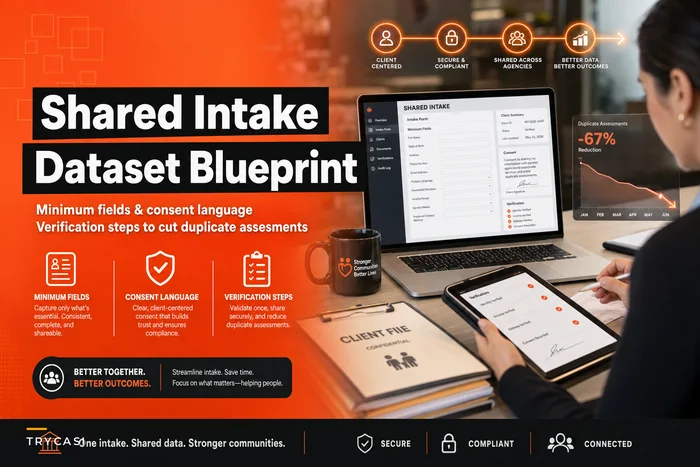
This connects directly to your intake design. If you've already built a shared intake dataset with minimum fields and verification steps, your validation rules should mirror those field definitions exactly. When intake and validation disagree, intake wins the argument at the front desk and loses it in the database — and the mismatch shows up as dirty data later.
The soft-warning vs hard-stop decision
Not every rule should block entry. A hard stop on a required consent date makes sense. A hard stop on a phone number during a crisis intake, when the client genuinely doesn't have a stable number, does not — you'll just train staff to enter "000-000-0000" to get past it, which is worse than a blank.
Use hard stops for fields that are legally or operationally non-negotiable. Use soft warnings ("this looks incomplete — continue?") for fields where a valid exception exists. The failure mode to avoid is validation so rigid that staff invent junk values to escape it.
Part 3: The monthly lightweight audit
An audit at this scale is not a formal review. It's a 30-to-45-minute monthly pass that a supervisor can run with basic exports and a spreadsheet — no analyst required. The point is catching drift while it's still small.
A monthly audit sequence that fits in one sitting:
-
Export active cases and count them. Compare against last month. A caseload that jumps or drops sharply without a known reason usually signals a status-field problem, not a real caseload change.
-
Check for blank required fields. Filter for missing consent dates, missing phone numbers, missing housing status on active cases. This is your dirty-data list for the month.
-
Check consent integrity. Every "consent
yes" should have a date; every closed case should have consent handled correctly. Flag mismatches.
-
Check risk flags without notes. Any active safety flag lacking a corresponding note or recent date gets escalated for follow-up.
-
Review access log. List users with no login in 60-plus days and any new admin-level accounts. Confirm each is still appropriate.
-
Spot-check five random records end to end. Do the structured fields match the narrative notes? A DOB that contradicts the case story, a housing status that doesn't match the notes — these reveal entry errors validation can't catch.
-
Log findings and assign corrections with a name and a due date. An audit with no assigned follow-up is just anxiety with a spreadsheet.
Turning the audit into a script
"Script" here doesn't mean code. It means a repeatable, written checklist that produces the same output every month regardless of who runs it — so when the usual supervisor is out, whoever covers gets identical results. Keep the audit steps, the exact filters, and the escalation thresholds in one document. If your case management platform can save filtered views or scheduled exports, build these seven checks as saved views once and you'll cut the monthly time down considerably.
This is also where lightweight automation earns its place quietly. A platform that can flag blank required fields, enforce validation at entry, and log access changes automatically turns most of the monthly audit into a review-the-exceptions task rather than a hunt-for-problems task. The governance logic stays yours — the software just stops you from having to eyeball 400 records by hand.
A real scenario: what this looks like in practice
A small housing-and-benefits nonprofit — six caseworkers, two supervisors, a rotating handful of student interns — was running everything in a case management system that "worked," but nobody trusted the reports. Their funder asked for housing-outcome numbers and the export came back with housing status entered eleven different ways. Three interns had full-caseload access from a login set up "temporarily" months earlier.
They didn't buy anything new. Over about three weeks they built the four-role matrix, revoked two stale intern logins the same afternoon they found them, converted housing status and referral agency to dropdowns, and added a consent-date-required rule. Then they ran the seven-step audit for the first time.
The first audit was ugly — roughly 60 active cases had at least one blank required field, and around a dozen consent records had no date attached. But that was the point: those problems had been invisible before. By the third monthly audit, blank required fields on active cases were down to single digits, the housing-status export finally aggregated cleanly, and the funder report that used to take the better part of two days came together in a morning. Not a dramatic transformation — it just became data people could actually work from.
The knock-on effect mattered more than the audit numbers: once the record was trustworthy, the shadow spreadsheets faded out, because there was no longer a reason to keep a "real" copy on the side.
When this makes sense — and when it doesn't
When this is worth doing: you have more than a couple of caseworkers, you report to any external funder, your caseload is past the point where one person can hold every record in their head (usually somewhere north of 150–200 active cases), or you've noticed staff keeping their own tracking documents. Any one of these means drift is already happening.
When it's overkill: a solo practitioner or a two-person team with 40 cases doesn't need a formal role matrix — they need clean field definitions and maybe a quarterly glance. Don't build governance machinery larger than the team it governs. The cost of over-engineering is that nobody follows it, which is worse than a simple system everyone actually uses.
Who should not start here: if your intake and consent processes are genuinely chaotic, fix those first. Governance sits on top of clean intake and clear consent. Bolting an access matrix onto a broken intake just organizes the mess. Sort the front door before you audit the house.
Where governance connects to everything else
Data governance isn't a standalone project — it's the connective tissue between intake, casework, and reporting. Clean validation makes your outcomes measurement possible, because you can't measure what you can't reliably count. A working role matrix protects the consent decisions your frontline staff make every day. The monthly audit is where you find out whether any of it is actually holding.
The teams that get this right aren't the ones with the biggest systems. They're the ones who treat governance as a small, repeating loop instead of a one-time setup — four roles, a handful of validation rules, and a monthly pass that takes less time than a staff meeting. Start with the matrix, add validation to the fields you report on, and run the audit once. The first one will surface things you didn't want to see. That's not a sign the system is broken. That's the system finally working.
Start with the matrix, add validation to the fields you report on, and run the audit once. The first one will surface things you didn't want to see. That's not a sign the system is broken. That's the system finally working.
Ready to transform your social services workflow?
Join 500+ agencies using TryCasi to improve case outcomes, enhance collaboration, and reduce administrative burden.