

Most caseworkers don't have a data problem because they're careless. They have a data problem because the fields that matter get filled in under pressure, at the end of a home visit, on a phone balanced against a car window. By the time anyone pulls a dashboard three months later, the housing status says "pending" for 40 clients who were housed in March, and nobody can reconstruct why.
The fix isn't a bigger audit. It's a small, boring routine that runs every week and only touches the fields that actually drive your reporting. This is a data quality checklist for social services built for people who have twelve minutes, not twelve hours.
Why case data rots in predictable places
Data doesn't degrade evenly. It rots in specific, identifiable spots — and once you know where, you stop wasting time checking everything.
Across case management systems, the same handful of fields cause almost all the reporting headaches:
-
Status fields that require manual updates (housing status, employment status, case stage). These lag reality because updating them is a separate step from the actual work.
-
Date fields entered from memory (date of enrollment, date of last contact). People approximate, or leave them blank and mean to come back.
-
Dropdown fields with a lazy default (referral source set to "Other" because scrolling the list takes too long).
-
Outcome or exit fields that only get touched at closure, when the caseworker is already mentally onto the next case.
The fields that break are almost never the ones clients care about. Names, phone numbers, addresses — those get corrected fast because someone calls the wrong number and the error surfaces immediately. The fields that rot are the ones that only matter to a report nobody reads until quarter's end. No feedback loop, so errors just sit.
That's the real insight behind this whole routine. You're building a small, deliberate feedback loop for fields that otherwise never get one.
The priority-field principle: check less, not more
The instinct when data quality slips is to check everything. That instinct is wrong, and it's why most data-quality efforts die after two weeks. Checking 40 fields per case is unsustainable, so people quietly stop.
Eliminate case management chaos.
TryCasi helps you organize, monitor, and report on every case efficiently and securely.
- Centralized case tracking
- Automated client notifications
- Team task coordination
No credit card required
Instead, pick the five to eight fields that actually feed your indicators. If you've already mapped which fields drive your outcome measures — and if you haven't, the practical framework for measuring social services outcomes walks through exactly how to tie indicators back to specific fields — this step is easy. You already know which data points roll up into your reports.
A typical priority-field list for a housing-focused program looks like this:
| Field | Why it's priority | Common failure |
|---|---|---|
| Housing status | Feeds the core outcome indicator | Not updated after placement |
| Date of last contact | Drives caseload activity reports | Left blank or guessed |
| Enrollment date | Anchors length-of-stay math | Entered wrong on intake |
| Referral source | Feeds partner reporting | Defaulted to "Other" |
| Case stage | Drives workflow and caseload counts | Stuck at old stage |
| Exit reason | Feeds all closure outcomes | Missing until audit |
Everything else can wait for a quarterly deep-check. These are the fields you touch every week because these are the fields that lie the most.
The 10-minute weekly routine
The routine works because it's short enough to actually happen. Longer than ten minutes and it becomes something people defer — and deferred data checks never get done.
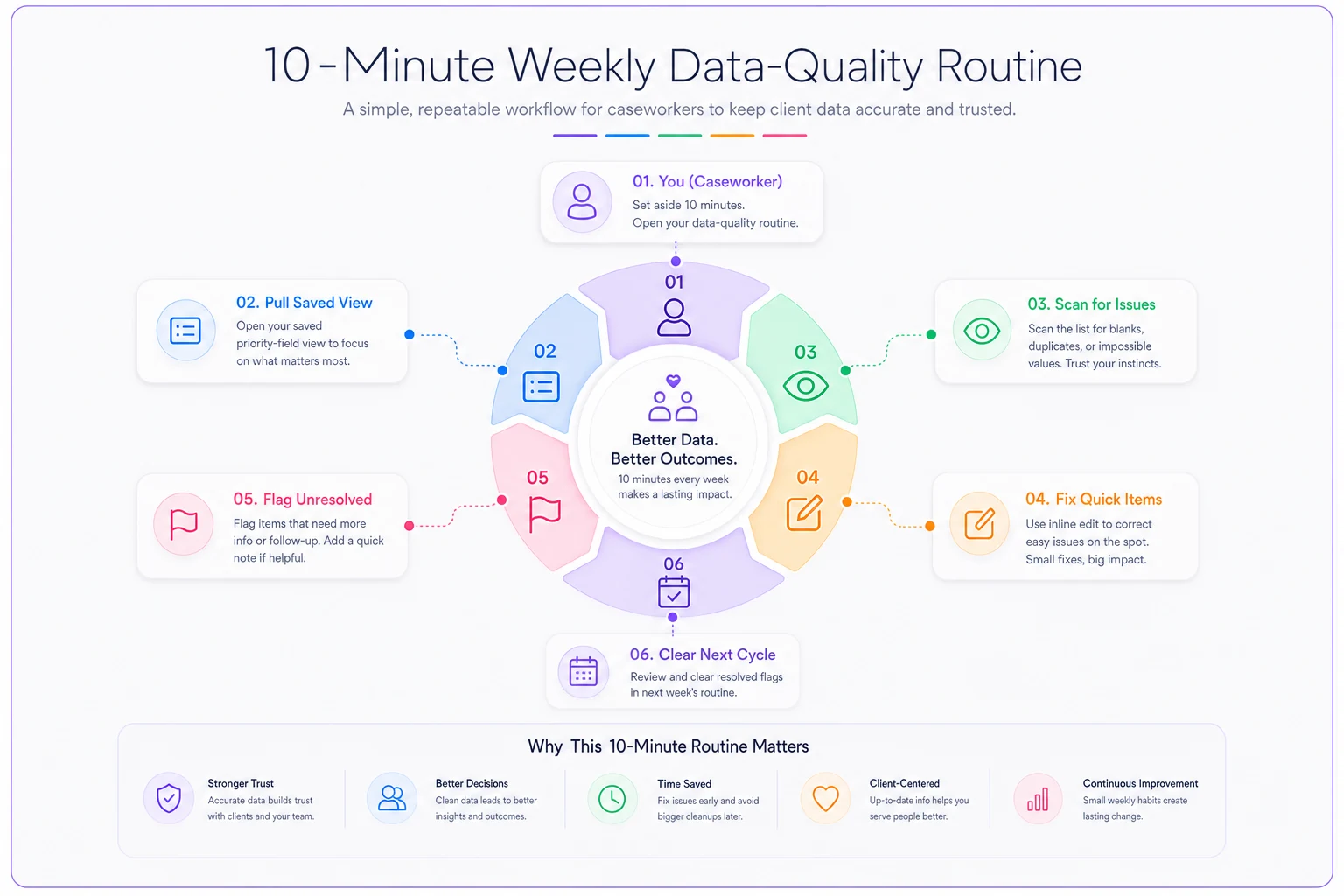
Here's the sequence for an individual caseworker running their own list:
-
Pull your active caseload filtered to your priority fields only. Not the full record — just the six or so columns that matter. Most systems let you save this as a view. Save it once, reuse it every week.
-
Scan for blanks and impossible values first. Blank enrollment dates, "pending" statuses older than 30 days, last-contact dates in the future. These jump out visually. Two minutes, tops.
-
Fix what you can from memory or quick notes. If you know the client was housed last Tuesday, update it now. Don't open a research project.
-
Flag what you can't fix. Anything requiring a call, a document, or a supervisor decision goes on a short list. Don't stall the whole routine on one uncertain record.
-
Clear your flag list before the next cycle. The flags from last week get resolved this week. This is the step people skip, and it's why it matters — flags create a rolling to-do that doesn't get lost.
The whole thing runs about ten minutes once you've set up the saved view. The first week takes longer because you're cleaning up accumulated mess. After that it's maintenance.
Visualized workflow below.
Teams that do this weekly end up spending less total time on data than the ones who don't — because they never face the quarter-end scramble of reconstructing three months of missing statuses. A drip of small weekly corrections is far cheaper than the flood.
Quick-correction workflows: making the fix faster than the flag
A routine only survives if fixing an error is easier than ignoring it. If correcting a housing status takes six clicks and a page reload, people won't bother during a ten-minute scan.
-
Inline editing. Being able to fix a value directly in the list view — without opening the full case record — cuts correction time dramatically. This alone is often the difference between a routine that lasts and one that collapses.
-
A "why" note on status changes. When someone changes housing status from "pending" to "housed," a one-line reason ("confirmed lease signed 3/14") prevents the next person from second-guessing it. Single most useful habit for reducing repeated errors.
-
Bulk fixes for systematic problems. If forty referrals all defaulted to "Other" during a broken intake week, fixing them one at a time turns the routine into punishment.
Allow inline editing in list views and require a one-line reason on status changes to prevent repeated corrections.
This is where operational software earns its place — not through anything flashy, but by making the correct action the path of least resistance. Case management platforms with AI-assisted checks can quietly flag the impossible values for you (a last-contact date in the future, a status that's been "pending" for 90 days), so the scan step in your weekly routine gets shorter over time. The point isn't automation for its own sake; it's that surfacing likely errors means the caseworker spends their ten minutes fixing, not hunting.
A realistic workflow example
Consider a mid-sized family services program: roughly 15 caseworkers, around 600 active cases between them. Before any routine, their quarterly housing-outcome report was consistently wrong — usually somewhere between 30 and 50 cases with stale "pending" statuses that had to be manually chased by a supervisor over two or three days at quarter close.
After introducing the weekly ten-minute scan plus inline correction, the quarter-end cleanup dropped to a handful of cases. The supervisor got roughly two days back per quarter and — more importantly — the numbers going to the funder stopped needing an asterisk. Nothing dramatic. The errors just got caught while they were still small and cheap.
The supervisor QA spot-check protocol
Individual routines drift without a light check on top. But a supervisor re-auditing every case defeats the purpose — that's just the heavy analytics you were trying to avoid. The answer is sampling.
-
Each week, pull a random sample of 5 cases per caseworker (or 10% of the caseload, whichever is smaller).
-
Check only the priority fields against reality — a note, a recent contact log, a document. One question: does the field match what actually happened?
-
Record a simple pass/fail per field, not a grade. Either it's accurate or it isn't.
-
Track the failure rate over time, not per person. If housing status fails 20% of the time across the whole team, that's a system problem — a confusing dropdown, a missing prompt — not fifteen careless people.
That last point is the one supervisors get wrong most often. When spot-checks turn into performance surveillance, caseworkers start gaming the fields instead of reporting reality, and your data quality gets worse. The spot-check exists to find broken workflows, not to catch individuals. Frame it that way out loud, and keep saying it.
A simple spot-check log looks like this:
| Caseworker | Sample size | Housing status | Last contact | Enrollment date | Notes |
|---|---|---|---|---|---|
| J.R. | 5 | 5/5 | 4/5 | 5/5 | One blank contact date |
| M.T. | 5 | 3/5 | 5/5 | 5/5 | Two stale "pending" — follow up |
Two rows, ten cases, five minutes. Do this weekly and you'll spot a degrading field long before it wrecks a report.
When this routine makes sense — and when it doesn't
This fits programs where indicators feed real decisions or funding, and where data is entered by the same people doing the casework. That's most social service teams.
It's less useful in a couple of situations. If your intake data is unreliable at the source — duplicate records, inconsistent fields, no verification at entry — a weekly correction routine is bailing water from a leaking boat. Fix the intake first. The shared intake dataset blueprint covers the minimum fields and verification steps that stop bad data before it enters the system. A cleaning routine downstream can't compensate for chaos upstream.
It also backfires when it's framed as a compliance stick. Teams that tie weekly checks to performance reviews reliably see the routine break — people enter whatever makes the check pass. The whole thing only works when it's about keeping the numbers honest for the clients and the mission, not auditing the staff.
And if you're a team of two sharing thirty cases, you probably don't need the formal spot-check layer at all. The priority-field scan is enough. Add supervisor sampling only once you've grown past the point where everyone can see everyone's caseload.
Templates to start Monday
You don't need special tooling to begin. Three things, buildable in whatever system you already have:
-
A saved priority-field view for each caseworker — the six-to-eight columns that feed your indicators, filtered to active cases. Single highest-leverage thing to set up.
-
A one-line flag list (a note, a shared doc, a task list) that carries unresolved corrections from one week to the next.
-
A two-row-per-caseworker spot-check log, tracking pass/fail on priority fields and reviewed for team-wide patterns rather than individual scores.
Set those up once and the routine mostly runs itself. Ten minutes for the caseworker, five for the supervisor, every week, same handful of fields.
The reason this beats a big annual data audit isn't that it's more thorough — it's that it actually gets done. A modest check that happens every week catches errors while they're still one client, one field, one easy fix. The heavy audit catches them after they've compounded into a report you can't trust and a quarter-end scramble nobody has time for.
Keep it small, keep it regular, and your indicators stay honest without anyone becoming a data analyst.
Ready to transform your social services workflow?
Join 500+ agencies using TryCasi to improve case outcomes, enhance collaboration, and reduce administrative burden.