

Most language-access audits fail in the same quiet way: the file looks compliant. There's an interpreter noted somewhere, the client speaks a language other than English, and everyone assumes the documentation holds up. Then a monitor pulls fifteen random files, asks a few pointed questions, and half the folder collapses—no interpreter ID, no record of which language was actually spoken, a consent form signed in English by a client whose intake explicitly says "limited English proficiency."
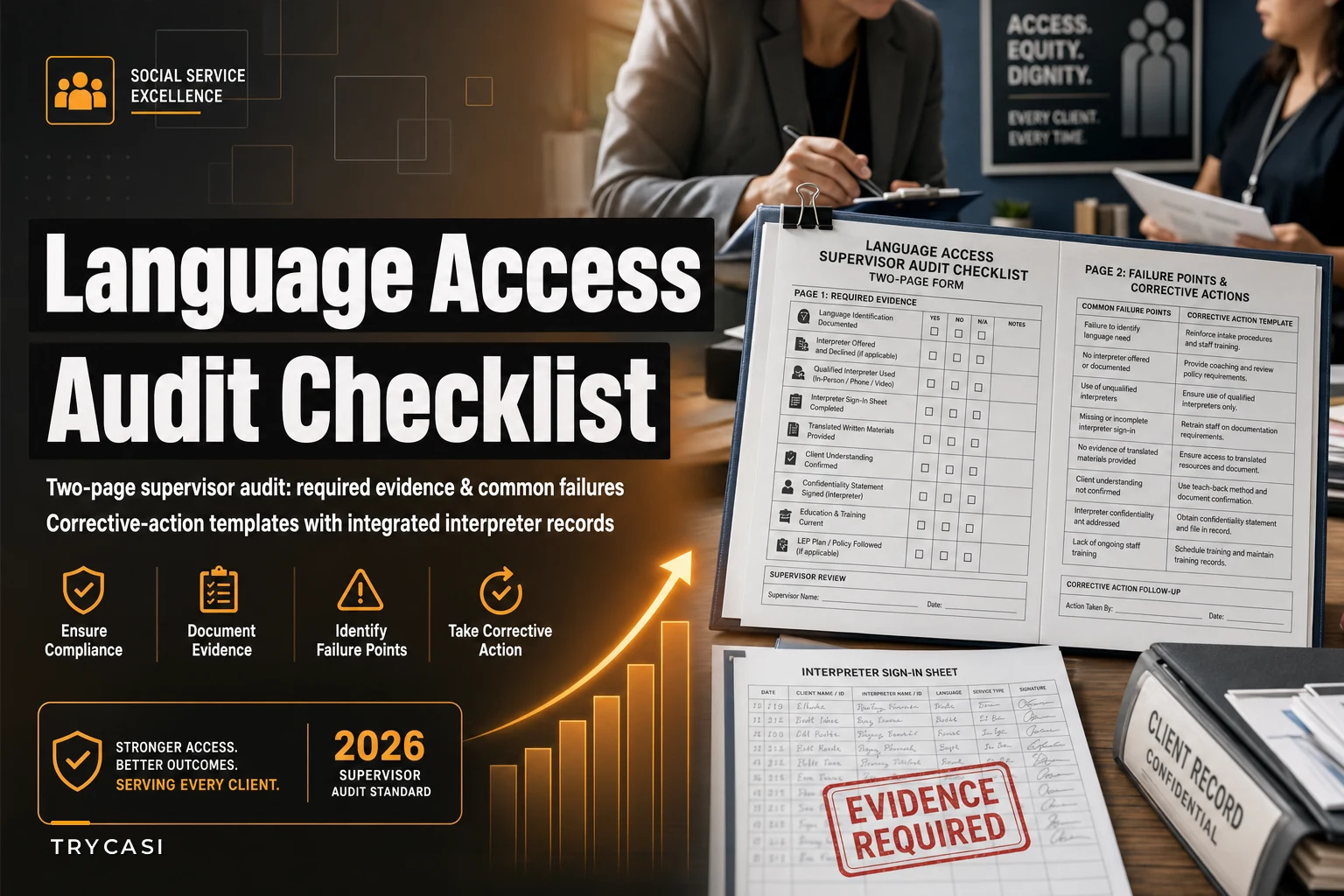
This is a form problem, not a training problem. Caseworkers usually do use interpreters. What they don't do is leave evidence a stranger could verify six months later. This piece gives you a two-page supervisor audit form you can print or drop into your case-review routine, built around the three things that actually get flagged: missing evidence, predictable failure points, and corrective actions nobody has time to invent on the spot.
If you want the checklist without the reasoning, jump to the form sections below. But the failure-point analysis is where the real value is—because once you see why these files break, you stop re-fixing the same three problems every quarter.
Why language-access files fail the audit and not the client
A client can receive genuinely good language-access service and still generate a file that fails review. The service happened in the room; the record didn't capture it.
In practice, this usually comes down to four things:
-
The interpreter was informal. A bilingual staff member or a family member interpreted, and nobody documented whether that was allowed, who it was, or whether the client consented to it.
-
Language preference was recorded once and never again. The intake says "Spanish preferred." Every subsequent note is silent, so an auditor can't tell if the follow-up call, the home visit, or the consent signing used an interpreter at all.
-
The consent form language doesn't match the client's language. This is the single most common hard failure. An English consent form, signed by an LEP client, with no interpreter attestation attached.
-
Nobody logged the modality. Phone interpreter, video, in-person, staff bilingual—these carry different documentation requirements, and files rarely note which one happened.
The pattern underneath all four: language access is treated as a service to deliver, not a fact to record. Auditors don't grade the service. They grade the record. A file where the interpreter clearly did great work but left no trace scores identically to a file where no interpreter was used at all.
The two-page supervisor audit form
The form is deliberately short. A supervisor should be able to run one file in three to four minutes. Anything longer and it won't get used past the first month.
Eliminate case management chaos.
TryCasi helps you organize, monitor, and report on every case efficiently and securely.
- Centralized case tracking
- Automated client notifications
- Team task coordination
No credit card required
Page one: required evidence per file
| # | Evidence item | Where it should live | Present / Missing / N/A |
|---|---|---|---|
| 1 | Language preference recorded at intake (spoken + written, separately) | Intake form / demographics | |
| 2 | LEP status flagged and visible on the case summary | Case header / cover sheet | |
| 3 | Interpreter used—modality noted (phone / video / in-person / qualified staff) | Contact note | |
| 4 | Interpreter identifier (vendor ID, staff name + qualification, or line/session number) | Contact note or interpreter log | |
| 5 | Consent form in the client's preferred written language OR interpreter attestation attached | Consent packet | |
| 6 | Documentation that interpreter was offered and, if declined, the decline recorded | Contact note | |
| 7 | Each subsequent contact notes language support used (or explicitly notes not needed) | Progress notes | |
| 8 | Vital documents (notices, denials, safety plans) translated or interpreted—recorded | Correspondence log |
Two items catch the most people: number 6 and number 7. An offered-and-declined interpreter needs to be documented as a decline, not left blank. And number 7—language support noted on every contact—is where files quietly rot. The intake is spotless; contact number nine says nothing.
Page two: failure points and corrective-action templates
This is the half supervisors actually asked for. Instead of a pass/fail, page two pairs each common failure with a pre-written corrective action, so the supervisor writes a case number and a date instead of drafting a paragraph from scratch.
Failure point A — Language preference missing or contradictory across the file Corrective action template: "Confirm preferred spoken and written language directly with client at next contact (by [date]). Update case header. Reconcile any conflicting prior entries with a dated correction note. Do not overwrite—annotate."
Failure point B — Interpreter used but no identifier logged Corrective action template: "Retrieve interpreter session/line number from vendor invoice or phone log for the contact dated [date]. If unrecoverable, add a note explaining the gap and confirm the identifier is captured going forward starting [date]."
Failure point C — Consent signed in English by an LEP client, no attestation Corrective action template: "Re-execute consent using the client's preferred-language form OR complete an interpreter attestation documenting the original consent was interpreted accurately. Target completion [date]. Flag as high priority—this is a hard finding."
Failure point D — Subsequent contacts silent on language support Corrective action template: "Add standing note field to all future contacts for this case. Retroactive correction not required, but supervisor to spot-check next three contacts by [date]."
Failure point E — Informal/family interpreter used without documented consent Corrective action template: "Document why a qualified interpreter wasn't used, whether the client consented to the informal interpreter, and whether any vital communication needs re-doing with a qualified interpreter. Complete by [date]."
These templates name a responsible action and a date, and several of them explicitly say "don't fix the past, fix the process going forward." That distinction matters. Trying to retroactively reconstruct language support on eighty old contacts is how audits eat a whole week and still miss the deadline.
A real scenario: the mid-size family services agency
A family services agency running roughly 400–450 open cases pulled a sample for an internal pre-review before their state monitor visit. Fifteen files, all belonging to clients flagged LEP at intake.
The intake numbers looked fine—every one of the fifteen had a language preference recorded. But once they applied item 7 (language support on every contact), the picture changed. Across those fifteen files, contacts after intake noted interpreter use on only about a third of entries. The rest were blank. Not because interpreters weren't used—staff confirmed they mostly were—but because the contact-note template had no field for it, so people didn't think to write it down.
The consent problem was smaller in volume but worse in severity. Four of the fifteen had English consent forms signed by LEP clients with no attestation. That's a hard finding in most monitoring frameworks, and four out of fifteen extrapolated across the full caseload is not a number you want a monitor to calculate for you.
They didn't try to fix history. They added a one-line language-support field to the contact-note template, re-executed the four consents with attestations, and ran the two-page form on twenty files a month for the next quarter. By the third monthly pass, blank language-support fields on new contacts had dropped to a handful, and no new consent gaps had appeared. The monitor visit surfaced two minor documentation notes instead of the systemic finding they'd been bracing for.
The lesson wasn't "train harder." It was "the record had nowhere to put the fact." Once the template had a field, the field got filled.
Running the audit: a simple monthly process
You don't need a big rollout. This works as a lightweight recurring routine.
-
Pull the sample. Ten to twenty files per month, weighted toward LEP-flagged cases. Random within that group.
-
Run page one per file. Present / missing / N/A. Don't editorialize yet—just check boxes.
-
For every "missing," jump to page two. Match it to the closest failure point and drop in the corrective-action template with a case number and date.
-
Sort corrective actions by severity. Consent findings (Failure C) go first, always. Everything else follows.
-
Assign and date. Every action needs an owner and a due date, or it won't happen.
-
Re-pull a small verification sample next month. Confirm the process fix stuck—not just that the individual file got patched.
The re-pull in step six is the part people skip, and it's the part that actually tells you whether you fixed a file or fixed a system. Patching fifteen files feels productive. Watching next month's fresh files come in clean is the real signal.
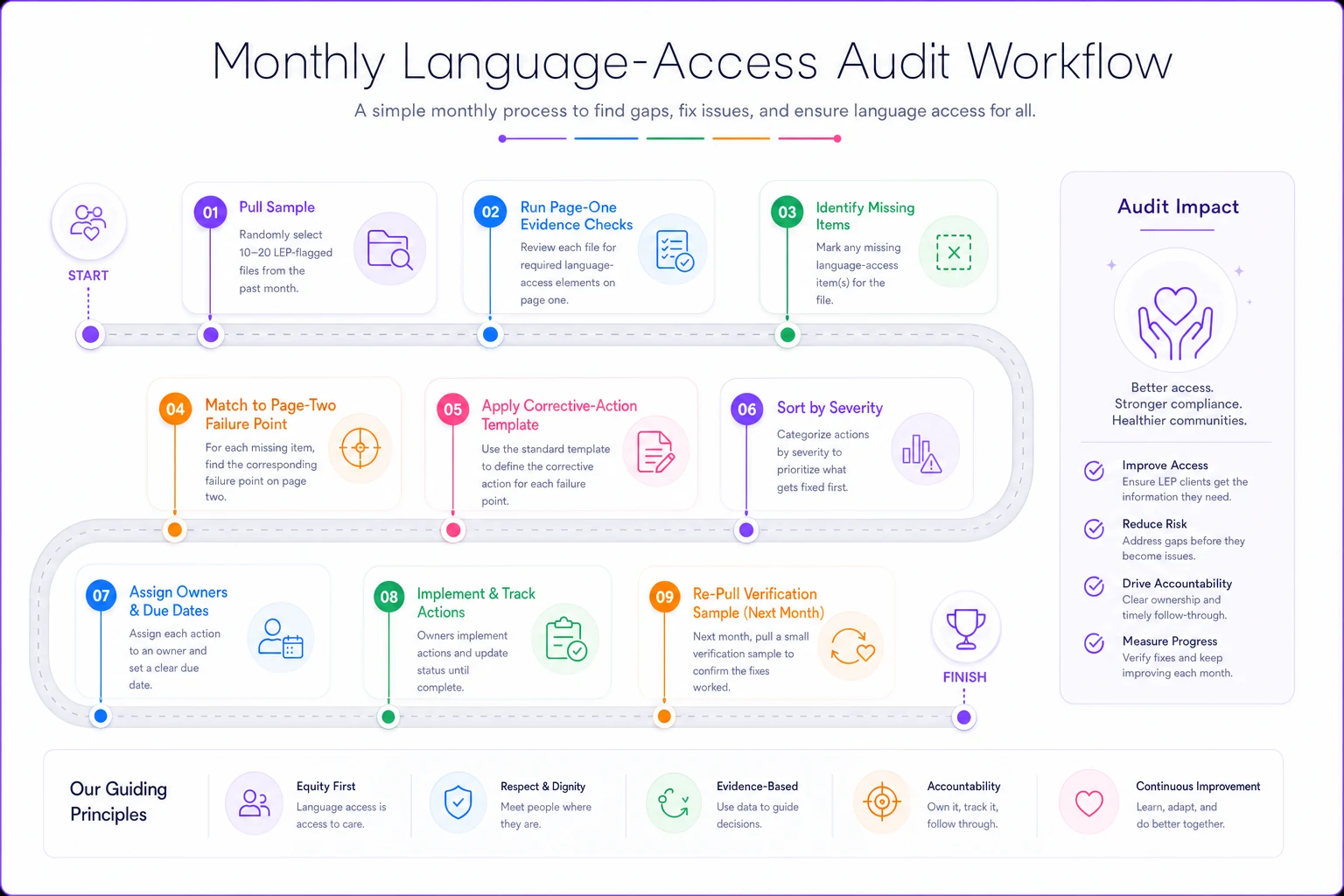
This visual outlines the monthly audit steps and where the corrective templates slot in.
When a full language-access audit makes sense—and when it doesn't
When it makes sense: you have a monitoring visit coming, you've had a recent finding, or your LEP caseload is a meaningful share of the total and you've never systematically checked the records. Also worth doing after any change to your intake or consent workflow—that's exactly when documentation fields quietly disappear.
When it's overkill: a very small caseload with two or three LEP clients you know well. In that situation a formal sampling process is theater. Just verify all of them directly and move on.
Who should not run this as-is: anyone whose consent workflow is genuinely broken at the source. If your consent forms don't exist in your clients' languages at all, an audit will just confirm what you already know, repeatedly and expensively. Fix the form library first. Getting your consent language and redaction rules right upstream—the kind of groundwork covered in operational consent workflows for social services—means the audit measures execution instead of re-diagnosing a gap you could fix in an afternoon.
Where the record-keeping quietly wins or loses
The uncomfortable truth about language-access documentation is that interpreter integration usually works better than the paperwork suggests. The service is happening. The evidence isn't.
That's a template-design problem more than anything else. When contact notes force a language-support entry—even a single dropdown for "interpreter used / not needed / offered-declined"—the field gets filled almost automatically, and the audit stops finding blanks. Agencies that have tightened their note structure around interpreter workflows, along the lines of what's laid out in culturally and linguistically appropriate notes, tend to walk into monitoring visits with far less to reconstruct.
If your case management system lets you make that field required rather than optional, that one setting does more for audit readiness than an hour of retraining.
If your case management system lets you make that field required rather than optional, that one setting does more for audit readiness than an hour of retraining.
Putting it to work
Print the two pages. Run ten files this month. You'll almost certainly find that your intake documentation is strong and your ongoing-contact documentation is thin—that's the near-universal pattern, and it's fixable with a template field, not a policy memo.
Fix the consent findings first, add the language-support field to your contact notes, and re-pull a small sample next month to confirm the fix held. Do that three months running and the audit stops being an event you dread and becomes a five-minute background check that catches problems while they're still cheap to fix.
Fix the consent findings first, add the language-support field to your contact notes, and re-pull a small sample next month to confirm the fix held. Do that three months running and the audit stops being an event you dread and becomes a five-minute background check that catches problems while they're still cheap to fix.
Ready to transform your social services workflow?
Join 500+ agencies using TryCasi to improve case outcomes, enhance collaboration, and reduce administrative burden.