


Remote and hybrid casework has a quiet failure mode that nobody names in the quarterly report: the clients who need you most are the ones your systems are least likely to reach. When a program shifts toward video visits, portal messaging, and e-signatures, people with unstable phones, prepaid minutes, no home internet, or low digital confidence don't disappear. They just stop showing up in your metrics. Their cases go stale. Then, three months later, someone opens the file and realizes there hasn't been contact since the last in-person appointment.
The mistake most teams make is treating digital inclusion as a one-time equipment problem — "we'll hand out some tablets" — when it's actually a layered system that has to survive turnover, bad cell coverage, dead devices, and clients who screen unknown numbers. This piece is about building that layered system, not buying gadgets.
Why access breaks unevenly (and why averages hide it)
The core issue with digital inclusion social services work is that access is not binary. A client isn't simply "online" or "offline." They might have a smartphone but no data past the 15th of the month. They might have Wi-Fi at a shelter that blocks video apps. They might read fine in person but freeze when a portal asks for a password reset.
Program dashboards average all of this away. You look at "82% of clients reached this month" and feel fine. But that 18% isn't random — it clusters. Older clients, rural clients, clients coming off incarceration, people in domestic violence situations who deliberately keep no traceable device. The gap concentrates in exactly the populations your equity goals are supposed to protect.
The pattern worth internalizing: as a program moves more workflow online, the cost of being disconnected rises for the client, not for the agency. The agency saves postage and windshield time. The disconnected client loses the appointment, the benefit renewal, the callback. Efficiency for you can quietly become exclusion for them. A layered plan exists to keep that from happening silently.
The layered model: fallback first, not last
Most access plans are built top-down — fancy portal at the top, and "call them if it fails" scribbled at the bottom. Flip it. Design the low-tech fallback as the floor everyone stands on, then add convenience layers above it.
Eliminate case management chaos.
TryCasi helps you organize, monitor, and report on every case efficiently and securely.
- Centralized case tracking
- Automated client notifications
- Team task coordination
No credit card required
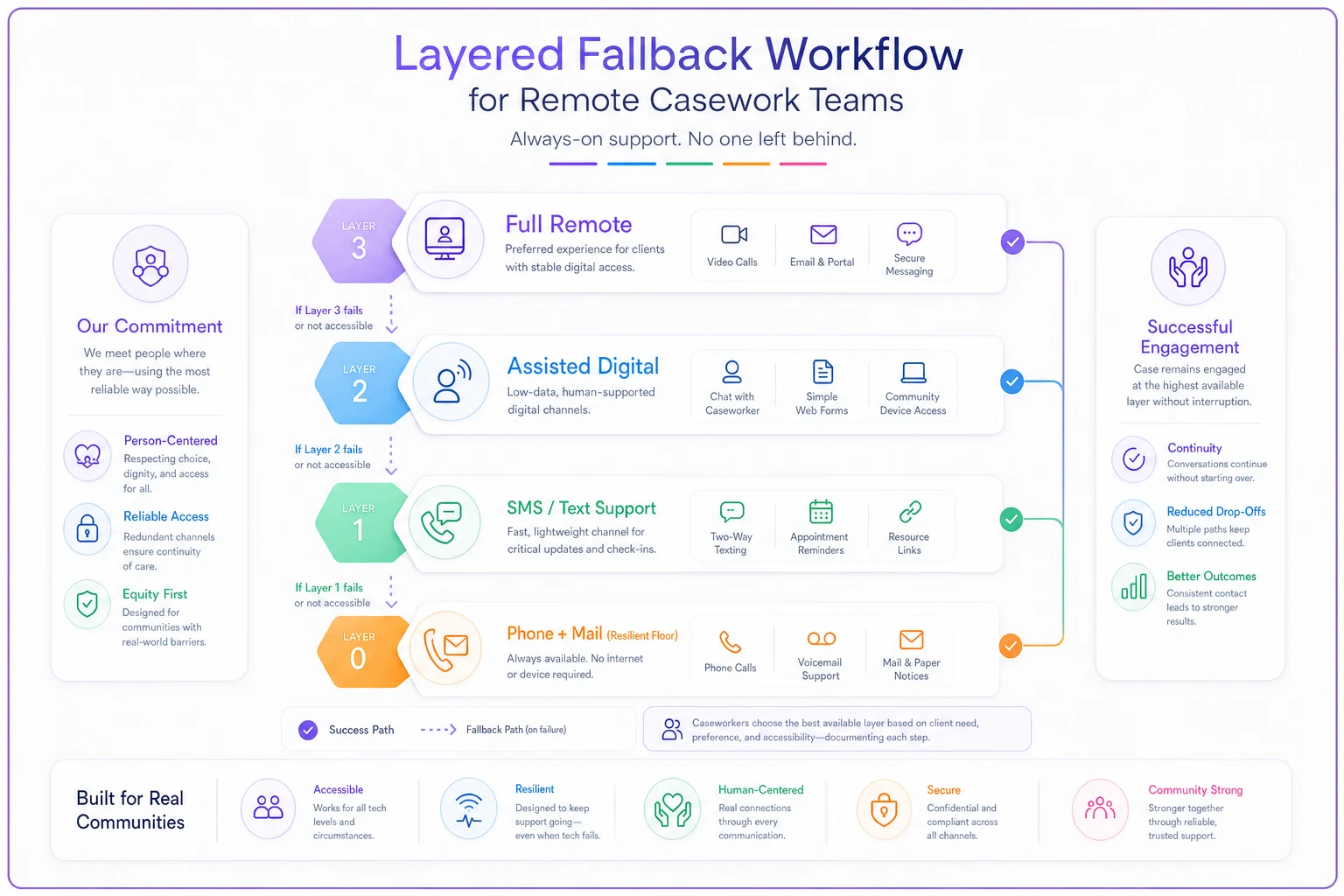
Think of four layers, from most resilient to most capable:
| Layer | Channel | Best for | Fails when |
|---|---|---|---|
| 0 — Floor | Phone call + mailed paper | Anyone, anytime; no device required | Wrong address, no voicemail, screening unknown numbers |
| 1 — Text | SMS / basic messaging | Quick reminders, yes/no confirmations, opt-in | Prepaid runs out, number changes, literacy barriers |
| 2 — Assisted digital | Loaner device + partner-site access | Forms, doc uploads, benefit portals | Device not returned, no charging, no data plan |
| 3 — Full remote | Video visits, client portal | Engaged, connected clients | Bandwidth, password friction, low digital confidence |
The important design rule: every case must have a working Layer 0 and Layer 1 path documented at intake. You don't wait until Layer 3 fails to figure out whether the phone number works. You confirm the floor first. Everything above it is a bonus, not a dependency.
This changes how you think about "reach." Reaching a client at Layer 0 isn't a failure or a downgrade. It's the system working as designed for that person, in that month, on that device situation.
Here's a quick visual of the layered fallback workflow.
The important design rule: every case must have a working Layer 0 and Layer 1 path documented at intake. You don't wait until Layer 3 fails to figure out whether the phone number works. You confirm the floor first. Everything above it is a bonus, not a dependency.
What each layer actually needs to function
Layers only work if the operational details underneath them are real. A "phone fallback" that relies on a caseworker's personal cell and a mental note isn't a fallback — it's a single point of failure with a person attached.
Use a shared, logged calling line rather than a caseworker's personal cell so covering workers can pick up a case.
Layer 0 — Phone and mail floor. This needs a shared, logged calling line so a covering worker can pick up a case, a standard voicemail script, and pre-formatted mailers for the three or four things you send most: appointment confirmations, document requests, and closure or re-open notices. Mail feels ancient until you serve clients whose only stable address is a relative's house or a shelter mailbox. For those clients, paper is the most reliable channel you have.
Layer 1 — SMS and phone. Texting is cheap and high-response, but it lives or dies on consent and clean logging. If you don't already have this nailed down, build it before you scale texting — the SMS and phone consent playbook covers opt-in scripts, audit logs, and what to do for clients without a secure phone. The operational trap here is assuming a text was received because it didn't bounce. It didn't bounce; it also wasn't read because the phone was off for a week. Build a "no response after two texts → drop to Layer 0" rule.
Layer 2 — Assisted digital / device provisioning. This is where programs overspend and under-plan. More on the actual recipe below, but the principle: a device without a data plan, a charging habit, and a return process is a $180 loss waiting to happen.
Layer 3 — Full remote. Reserve your video and portal investment for clients who are genuinely ready for it. Pushing a portal on someone who isn't just generates password-reset tickets and abandoned sessions that look like engagement in the logs but produce nothing.
Short-term device-provisioning recipes
When you do need to get a client connected fast, don't improvise. Have two or three pre-built recipes a caseworker can execute without a procurement meeting.
Here's a simple, repeatable process for a short-term loaner:
-
Confirm the real barrier. Is it no device, no data, or no confidence? A client with a working phone and no confidence needs a 20-minute walkthrough, not hardware. Provisioning the wrong thing wastes both budget and the client's trust.
-
Match the recipe to the barrier. No device → loaner tablet with a prepaid data SIM. No data only → a data top-up or a hotspot. No confidence → assisted session at a partner site, no hardware issued.
-
Set the return terms in plain language, verbally and on one page. "This is yours to use for 60 days. We'll text you a reminder at day 45. If you need it longer, call us." Skip legalese; it kills return rates.
-
Log the asset against the case. Serial number, issue date, expected return, and the caseworker who owns follow-up. Untracked devices are how a program loses six tablets a quarter and can't explain it in the audit.
-
Pre-load only what's needed. The benefit portal, the video app, a large-text contact card with your Layer 0 phone number. A cluttered device intimidates low-confidence users and increases support calls.
-
Schedule the first assisted use. The device isn't "delivered" until the client has completed one real task on it with help — uploaded a document, joined one video call. Otherwise it sits in a drawer.
A practical budget note: a short-term loaner program running around 25–30 active devices tends to cost somewhere in the range of $1,200–$1,800 a month once you factor in data plans, replacements, and a modest loss rate. That's usually far cheaper than the caseload churn and reopened cases that come from clients dropping out of contact — but only if return tracking is disciplined. Loose tracking flips the math fast.
Partner scripts: extending reach without extending headcount
You will never own enough devices or enough hours to close the access gap alone. Libraries, shelters, clinics, faith organizations, and workforce centers are already where your disconnected clients physically are. The move is to turn those locations into Layer 2 access points — not through a big MOU, but through short, concrete scripts.
A partner script is a half-page that tells a front-desk person at a partner site exactly what to do when your client walks in needing help. For example:
-
When a client says they're working with [Agency] and need to fill out a form: "Sure — you can use the computer at station 2. If you get stuck, call this number and ask for the on-call worker." (Your Layer 0 line.)
-
When a client needs to join a video visit "You can use our private room from 10–4. Here's the link card. Give them a call five minutes early."
-
When a client needs a document scanned or uploaded point to the scanner, hand them the one-page upload instructions.
Partners don't fail to help because they don't care — they fail because they don't know what "helping" looks like in your specific workflow. A script removes the guesswork. And when you serve clients across languages, those scripts and any accompanying materials have to be translated and phrased consistently — the conventions in this guide on culturally and linguistically appropriate notes and interpreter workflows apply directly to client-facing access instructions too, not just internal notes.
Simple equity metrics a supervisor can actually run
A layered plan is worthless if nobody checks whether the bottom layers are catching people. But most access metrics are either too vague ("engagement is up") or too heavy for a frontline supervisor to run monthly. Keep it to a handful of numbers that expose the gap instead of hiding it.
-
Channel-of-last-contact distribution. What share of active cases were last reached by phone/mail vs. text vs. digital? A sudden collapse in the phone/mail share isn't a win — check whether disconnected clients simply went quiet.
-
Contact-gap flags. Count cases with no successful contact in 30 / 60 / 90 days. Then cross-tab those flags against ZIP code, age band, and language. If the 60-day gaps cluster in one group, that's your access failure in plain sight.
-
Layer-0 coverage. Percentage of active cases with a verified working phone number or mailing address on file. This should be near-total. When it drifts below the low 90s, dropouts are coming.
-
Device return rate and time-to-return. Below roughly 80% return and you have a budget and tracking problem, not an access program.
-
Assisted-session completion. Of clients issued a device or referred to a partner site, how many completed one real task within two weeks? Low completion means your recipes or scripts need fixing.
The single most useful move here is the cross-tab. Overall engagement can look healthy while a specific subgroup silently drops off. Averages comfort; disaggregation reveals. A supervisor who spends fifteen minutes a month cross-tabbing contact-gap flags against demographics will catch equity failures a full quarter before they surface as a caseload crisis.
Where this holds up — and where it strains — as you scale
A small team of a handful of caseworkers can run all of this on shared spreadsheets and a group calling line. The layers are conceptual; the tracking is manual. That's fine at low volume.
The strain shows up around the point where no single person can hold the whole client roster in their head. That's when the informal system quietly breaks:
-
Device tracking on a spreadsheet drifts out of date, and returns stop happening.
-
The Layer 0 → Layer 1 fallback rules live in people's habits, so when someone leaves, cases fall through the transition.
-
Partner scripts get out of date and nobody notices until a client reports being turned away.
-
Nobody's actually running the equity cross-tabs, because pulling them by hand takes half a day.
This is the coordination bottleneck, and it's where an operational case-management platform earns its keep — not for flash, but for the boring things that fail silently at scale. The value is in fallback rules that trigger automatically (no successful text in X days → task the caseworker to call), asset tracking tied to the case record so devices don't vanish, and access dashboards that produce the disaggregated cuts without a supervisor building pivot tables by hand. A platform that flags a 60-day contact gap and surfaces which subgroup it's concentrated in turns a quarterly surprise into a Tuesday task. The point isn't the software; it's that the layered plan stops depending on any one person remembering to run it.
When a full device program is the wrong call
Provisioning hardware feels like the obvious answer, and sometimes it's a mistake.
-
When your gap is confidence, not access. If most disconnected clients actually own working phones, spend on assisted sessions and simplified instructions, not tablets.
-
When you can't staff return follow-up. A device program without someone owning returns will bleed hardware and blow up your budget by the third quarter. Don't start it until that role exists.
-
When partner sites already cover your geography. If a library and two clinics sit within reach of most clients, a strong Layer 2 partner network may close the gap at a fraction of the cost.
-
When the population deliberately avoids traceable devices. For some safety situations, handing out a logged, trackable device is exactly wrong. Phone and mail, on the client's terms, is the responsible floor.
Start with the floor. Add layers only where the data shows a real, concentrated gap.
A short real scenario
A mid-sized county case-management team — around a dozen caseworkers carrying roughly 400 active cases — moved most contact to a client portal after a remote push. Reported engagement looked fine, hovering in the low 80s. But when a supervisor finally cross-tabbed 60-day contact gaps by age and language, the picture cracked: clients over 60 and Spanish-preferred clients were being reached at noticeably lower rates, and a cluster of cases hadn't had successful contact in nearly two months.
They didn't buy anything fancy. They set a verified Layer 0 phone and mail check as an intake requirement, wrote a two-text-then-call fallback rule, and turned a nearby library and a clinic into scripted Layer 2 sites. Device provisioning stayed small — about 20 loaners with tracked returns.
Over the next couple of months, the 60-day gap cluster shrank substantially, and the demographic spread in contact rates narrowed to something much closer to even. Overall "engagement" barely moved on the top-line dashboard — which was exactly the point. The gains were entirely in the group the average had been hiding.
The takeaway
Digital inclusion in casework isn't about how modern your tools look. It's about whether the least-connected person on your roster still has a reliable path to reach you when their phone dies, their data runs out, or a portal locks them out. Build the low-tech floor first, layer convenience on top, extend reach through scripted partners, and measure access by looking at the subgroups your averages conceal. Do that, and remote casework becomes more equitable rather than quietly less.
Ready to transform your social services workflow?
Join 500+ agencies using TryCasi to improve case outcomes, enhance collaboration, and reduce administrative burden.