


A community health center in Phoenix tracked their home visit program for six months. Out of roughly 1,400 scheduled visits, they had 312 no-shows. Each missed visit burned about three hours between travel, waiting, documentation, and rescheduling. The financial hit came to around $87,000 in lost billing and wasted staff time.
Their outreach system? One generic reminder call the day before.
Most social service programs run the same basic sequence. Schedule the visit, maybe send a reminder, hope the client shows up. When no-show rates hit 20% or higher, programs scramble to overbook slots or add extra confirmation calls without really knowing what works.
Programs that actually reduce no-shows below 10% treat outreach like an operational system, not a checkbox. They test different message timing, track response patterns, and adjust their sequences based on client segments. More importantly, they build redundancy into their communication without overwhelming clients.
Why standard reminder calls fail for home visits
Home visits create unique communication challenges that office appointments don't have. The client needs to remember the appointment, be home at the right time, have the house accessible, and often coordinate with other household members. A single voicemail 24 hours before doesn't cut through these layers.
Social service clients face additional barriers. Phone numbers change frequently. Voicemail boxes fill up. Some clients avoid unknown numbers due to collection calls. Others share phones or have limited minutes. Text messages might go to phones without data plans.
The timing problem compounds everything. Call too early and clients forget. Call too late and they can't adjust their schedule. Most programs default to 24-hour reminders because that's what medical clinics do, but medical appointments involve the client traveling to a fixed location. Home visits require the client to structure their entire day around being home.
Case managers often develop their own unofficial systems. They might text certain clients, call others multiple times, or send reminder letters to addresses they suspect are unstable. When that case manager leaves, their knowledge walks out with them.
Building sequences that actually reduce no-shows
Effective outreach sequences need multiple touchpoints spread across different channels and timeframes. You're creating redundancy without annoyance.
Eliminate case management chaos.
TryCasi helps you organize, monitor, and report on every case efficiently and securely.
- Centralized case tracking
- Automated client notifications
- Team task coordination
No credit card required
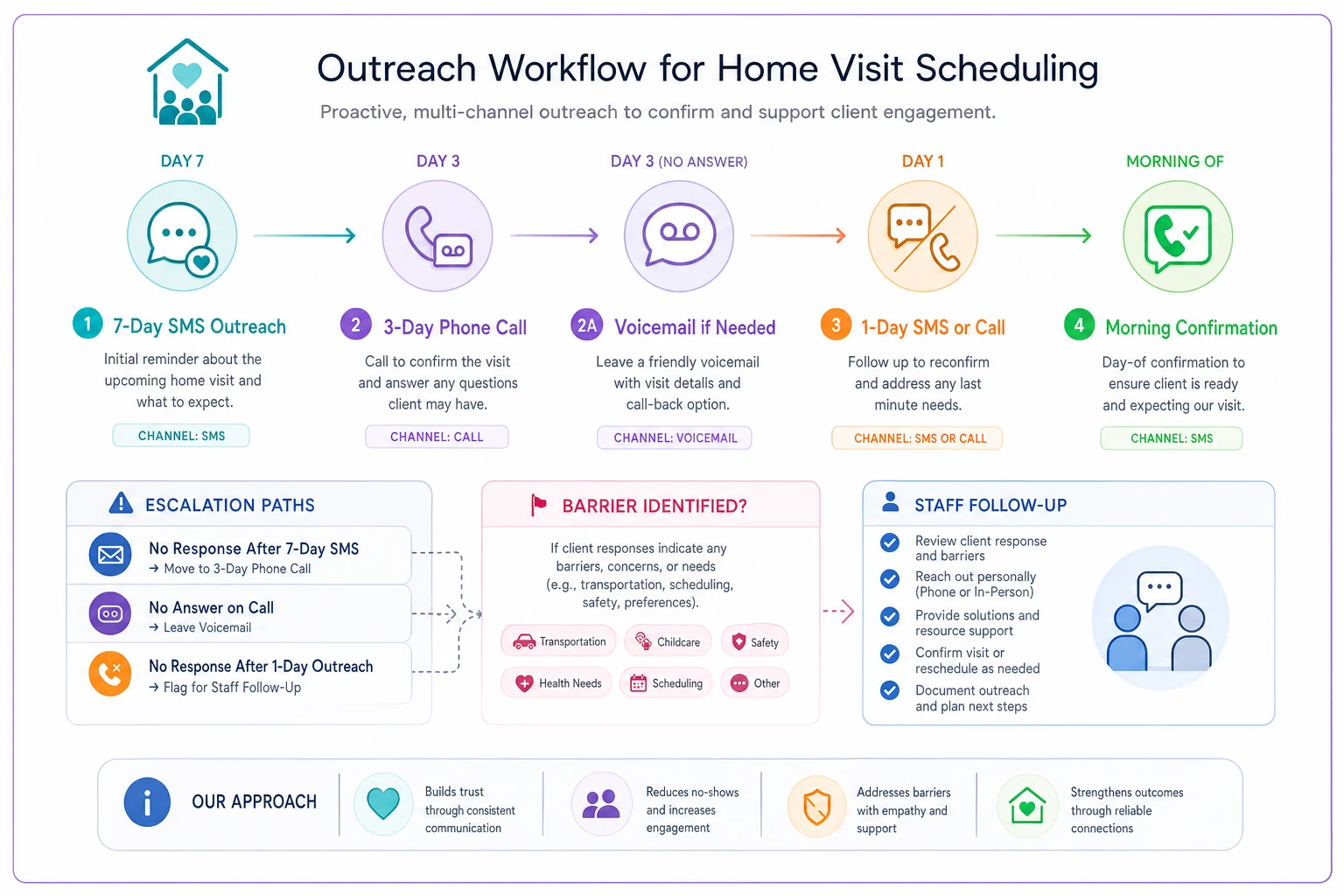
A mental health program serving about 180 clients monthly dropped no-shows from 22% to 9% with this sequence:
7 days before visit:
-
Initial SMS
"Hi [Name], this is [Case Manager] from [Program]. Your next home visit is scheduled for [Day] [Date] at [Time]. Reply YES to confirm or CALL to reschedule. Text STOP to opt out."
3 days before:
-
Phone call attempt (voicemail if no answer)
"Hello [Name], this is [Case Manager] calling from [Program]. I'm looking forward to seeing you on [Day] at [Time] for our home visit. If you need to change the time, please call me back at [Number]. If this time still works, no need to call back."
1 day before:
-
SMS
"[Name], reminder about tomorrow's visit at [Time]. I'll arrive between [Time range]. Make sure someone over 18 is home. Reply with any questions."
-
If no SMS capability, second call attempt
Morning of visit:
-
Final SMS (2 hours before)
"Hi [Name], [Case Manager] here. On my way for our [Time] visit today. See you soon!"
The spacing and escalation matter. Seven days gives enough time to reschedule. Three days catches people who forgot to respond. One day serves as the actual reminder. Morning-of confirmation prevents wasted trips when something came up overnight.
Start with a 7-day SMS so clients have time to reschedule before last-minute conflicts.
Here's a simple visual of that outreach workflow.
The spacing and escalation matter. Seven days gives enough time to reschedule. Three days catches people who forgot to respond. One day serves as the actual reminder. Morning-of confirmation prevents wasted trips when something came up overnight.
Scripts that work vs scripts that don't
Generic scripts kill engagement. Compare these two voicemail messages:
Generic version:
"This message is for [Name]. You have an appointment scheduled with [Agency] tomorrow at 2 PM. Please call if you need to cancel."
Effective version:
"Hi [Name], this is Sarah from the housing program. I'm calling about our visit tomorrow afternoon at 2. I'll be bringing those forms we discussed for your recertification. The visit should take about 45 minutes. If something's come up and you need to reschedule, give me a call back at 555-0123. Otherwise, I'll see you tomorrow."
The second version works because it's personal, specific, and includes context. The client knows who's calling, why they're coming, what to expect, and what to do if plans changed.
Text messages need different optimization:
Weak SMS:
"Appointment reminder: Tomorrow 2 PM"
Strong SMS:
"Hi Maria, Jake from Family Services here. Confirming our home visit tomorrow (Wed 11/15) at 2 PM. I'll help with your benefits renewal. Reply if you have questions."
The strong version identifies the sender, gives context, and opens dialogue. Clients receiving multiple services can actually tell which appointment this refers to.
Low-cost A/B tests that reveal what works
You don't need expensive software to test outreach effectiveness. Start with spreadsheet tracking and basic variations.
Test 1: Timing variations
Split your caseload into three groups:
-
Group A
Gets day-before reminder only
-
Group B
Gets 3-day and day-before reminders
-
Group C
Gets 7-day, 3-day, and day-before reminders
Track no-show rates for each group over 30 days. The data usually shows diminishing returns after three touchpoints, but the optimal timing varies by population.
Test 2: Channel preferences
For clients with both phone and text capability:
-
Week 1
Phone reminders only
-
Week 2
Text reminders only
-
Week 3
Both channels
-
Week 4
Client choice (ask their preference)
One housing program found that letting clients choose their reminder method dropped no-shows by 7 percentage points compared to using both channels for everyone.
Test 3: Message framing
Rotate between different message frames:
-
Loss frame
"Missing this visit means waiting 3 weeks for the next opening"
-
Gain frame
"This visit helps you maintain your benefits without interruption"
-
Neutral frame
"Your home visit is scheduled for Tuesday at 10 AM"
-
Personal frame
"Looking forward to checking in with you Tuesday"
Track which framing generates more confirmations and fewer no-shows. Loss framing often works for new clients while personal framing works better for established relationships.
Test 4: Response requirements
Compare passive versus active confirmation:
-
Passive
"Call only if you need to reschedule"
-
Active
"Reply YES to confirm or CALL to reschedule"
Active confirmation typically increases administrative work but can reduce no-shows by 3-5% by creating commitment.
Monitoring metrics beyond basic no-show rates
Raw no-show percentage tells only part of the story. Programs that successfully reduce no-shows track multiple metrics:
Confirmation rate: What percentage of clients actively confirm their appointment? Low confirmation rates predict future no-shows even if current rates look acceptable.
Reschedule rate: How many clients proactively reschedule versus no-showing? High reschedule rates indicate your outreach gives enough lead time.
Contact success rate: What percentage of reminder attempts actually reach the client? If only 40% of calls connect, your reminder system has limited impact.
Channel effectiveness: Which communication methods generate responses? Track confirmations, reschedules, and no-shows by channel.
Time-to-response: How quickly do clients respond to outreach? Immediate responses suggest good timing. Delayed responses might mean you're reaching out too early.
Attempt efficiency: How many contact attempts before successful connection? If it takes four calls to reach most clients, you might need alternative channels.
Simple tracking framework:
| Metric | Target | Current | Action Trigger |
|---|---|---|---|
| No-show rate | <10% | 14% | Review sequence if >12% |
| Confirmation rate | >60% | 47% | Add touchpoint if <50% |
| Contact success | >70% | 58% | Verify contact info if <60% |
| Reschedule rate | 5-10% | 3% | Earlier outreach if <5% |
| Same-day cancellations | <5% | 8% | Morning confirmation if >5% |
Simple tracking framework:
Adjusting sequences for different client segments
One-size-fits-all sequences waste resources and annoy clients. Segmentation improves both efficiency and outcomes.
New vs established clients:
-
New clients (first 3 visits)
7-day, 3-day, 1-day, morning-of
-
Established clients (4+ visits)
3-day and morning-of only
High vs low risk:
-
No previous no-shows
Standard sequence
-
1-2 previous no-shows
Add personal call from case manager
-
3+ no-shows
Require active confirmation 48 hours prior or release slot
Technology access:
-
Smartphone with data
SMS primary, app notifications if available
-
Basic phone with text
SMS only, no links or images
-
Voice only
Multiple call attempts, detailed voicemails
-
No phone
Mailed reminders, neighbor contact if authorized
Geographic distance:
-
Under 30 minutes travel
Standard morning-of reminder
-
30-60 minutes
Earlier morning confirmation
-
Over 60 minutes
Night-before final confirmation
One-size-fits-all sequences waste resources and annoy clients. Segmentation improves both efficiency and outcomes.
When automated sequences make sense (and when they don't)
Automation can handle routine reminders, but home visits often need human judgment. Programs with lowest no-show rates use hybrid approaches.
Good automation candidates:
-
Initial appointment confirmations
-
Standard reminder sequences
-
Rescheduling links
-
Confirmation tracking
-
Basic responses to client texts
Keep human:
-
Complex rescheduling negotiations
-
Addressing specific concerns
-
Barrier problem-solving
-
Relationship building
-
Crisis situations
A behavioral health program automated their standard reminders but kept personal calls for specific situations. Case managers spend 70% less time on routine reminders while maintaining the personal touch where it matters.
The automation handles the 7-day and 3-day messages, tracks responses, and flags concerns for human follow-up. Case managers review flags daily and make personal calls when clients express uncertainty, mention barriers, or have history of no-shows.
This hybrid model preserves case manager time for high-value interactions while ensuring consistent basic outreach. Operational software tracks all interactions in one place, so case managers see the full communication history before calling.
Programs using AI-powered scheduling platforms report interesting patterns. The software identifies which clients respond better to morning versus evening outreach, which message styles generate more confirmations, and which clients need extra touchpoints. Case managers use these insights to customize their approach without managing complex spreadsheets.
Real results from systematic testing
A supportive housing program serving 240 clients monthly documented their testing process over eight months. They started with 26% no-shows and standard 24-hour reminder calls.
Month 1-2: Added 3-day reminder SMS. No-shows dropped to 21%.
Month 3-4: Tested morning-of confirmation. No-shows hit 16%.
Month 5-6: Segmented high-risk clients for personal calls. Reached 13% no-shows.
Month 7-8: Let clients choose preferred channels and timing. Stabilized at 11% no-shows.
The total reduction meant 36 fewer missed visits monthly. At roughly $280 per visit in lost billing and three hours of wasted time, the program saved about $10,000 monthly and freed up 108 hours of staff time.
More importantly, clients received consistent services. The care coordinator noted that medication adherence improved, crisis calls decreased, and client satisfaction scores increased once people stopped missing visits.
They now run quarterly tests on message wording and timing, tracking results in basic spreadsheets. Nothing fancy, just consistent measurement and adjustment based on what the data shows.
Building your testing framework
Start simple. Pick one variable, test for 30 days, measure results, then move to the next test.
Week 1-2: Baseline measurement
Track your current no-show rate, confirmation rate, and contact success rate. Document your existing outreach process.
Week 3-6: First test
Choose your highest-impact variable (usually timing or channel). Run the test with clear groups and consistent tracking.
Week 7-8: Analysis and adjustment
Compare results, implement the winning approach, let it stabilize.
Week 9-12: Second test
Move to the next variable. Build on what you learned from the first test.
Keep a simple testing log:
-
Test name and dates
-
Groups and variations
-
Sample sizes
-
Results
-
Decision
-
Next test
Some tests will show no difference. That's valuable too, because you can eliminate that variable and focus elsewhere.
The difference between reducing no-shows and just accepting them
Programs that accept high no-show rates as inevitable usually share certain characteristics. They blame clients for being unreliable. They add buffer time to account for missed visits. They overbook schedules assuming a percentage won't show. They treat outreach as an administrative task rather than a core operational function.
Programs that successfully reduce no-shows below 10% think differently. They view no-shows as a systems problem. They test and refine their outreach sequences. They segment clients based on needs and preferences. They track leading indicators, not just outcomes.
The financial case is clear. A program with 200 monthly visits and 20% no-shows loses about $11,000 monthly in billing and wastes 120 hours of staff time. Reducing no-shows to 10% recovers $5,500 monthly and 60 hours. That's $66,000 annually, enough to fund a part-time position or technology upgrades.
But the real impact goes beyond numbers. Consistent visits mean better outcomes. Clients stay engaged with services. Case managers build stronger relationships. Programs meet their service targets. The entire operation runs more smoothly when people show up as scheduled.
The programs getting this right don't have special resources or perfect clients. They just treat outreach as an operational system worth optimizing. They test what works for their specific population. They measure results and adjust based on data. They build sequences that respect both client needs and program constraints.
Your next step is straightforward. Measure your current no-show rate. Pick one test from this article. Run it for 30 days. See what happens. Then test something else. Within six months, you'll have an outreach sequence tailored to your specific program and population, with no-show rates that other programs think are impossible.
Ready to transform your social services workflow?
Join 500+ agencies using TryCasi to improve case outcomes, enhance collaboration, and reduce administrative burden.